Chapter 3 · Journey step 7
Tutor: learn a concept with guided lessons
Tutor teaches one concept at a time from your board's syllabus. Classy asks you questions and gives a hint only when you need one, so you work the answer out yourself and remember it in the exam.
- Best for
- Learning a whole concept
- Time per lesson
- About 10–15 min
- Where
- Tutor tab
- Plan
- Free: 3 new lessons a week
Tutor, Solver or Create Test?
All three use Classy. Pick by what you need right now.
| Tutor | Solver | Create Test | |
|---|---|---|---|
| Use it when | You want to learn or relearn a concept | You're stuck on one question | You want to check yourself before a test |
| How it works | Questions + hints, up a 4-level ladder | Breaks one problem into steps, checks each | Timed multiple-choice questions with lifelines |
| Typical time | 10–15 min | About 5 min | 5–15 min |
| You end with | Lesson summary + next concept | A solved problem + full worked solution | A score you can beat on replay |
| Free plan | 3 new lessons a week | 3 doubts a week | 2 tests or practice sets a week |
Use it when
- Tutor
- You want to learn or relearn a concept
- Solver
- You're stuck on one question
- Create Test
- You want to check yourself before a test
How it works
- Tutor
- Questions + hints, up a 4-level ladder
- Solver
- Breaks one problem into steps, checks each
- Create Test
- Timed multiple-choice questions with lifelines
Typical time
- Tutor
- 10–15 min
- Solver
- About 5 min
- Create Test
- 5–15 min
You end with
- Tutor
- Lesson summary + next concept
- Solver
- A solved problem + full worked solution
- Create Test
- A score you can beat on replay
Free plan
- Tutor
- 3 new lessons a week
- Solver
- 3 doubts a week
- Create Test
- 2 tests or practice sets a week
The Tutor screen
What each numbered part does.
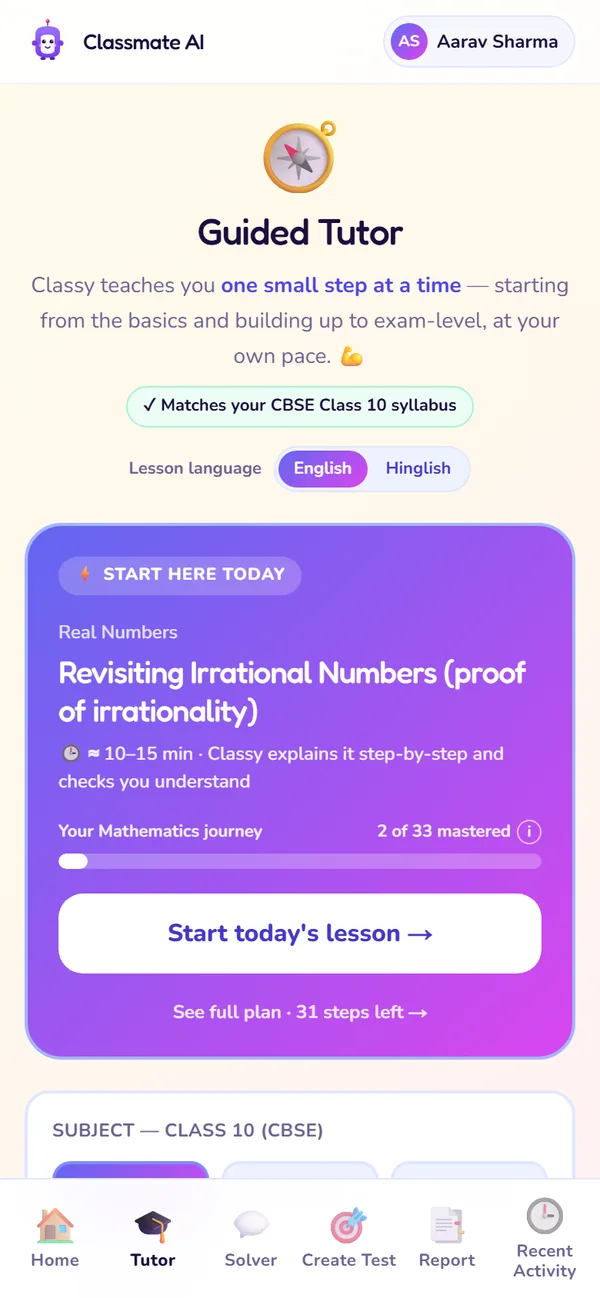
Start here today
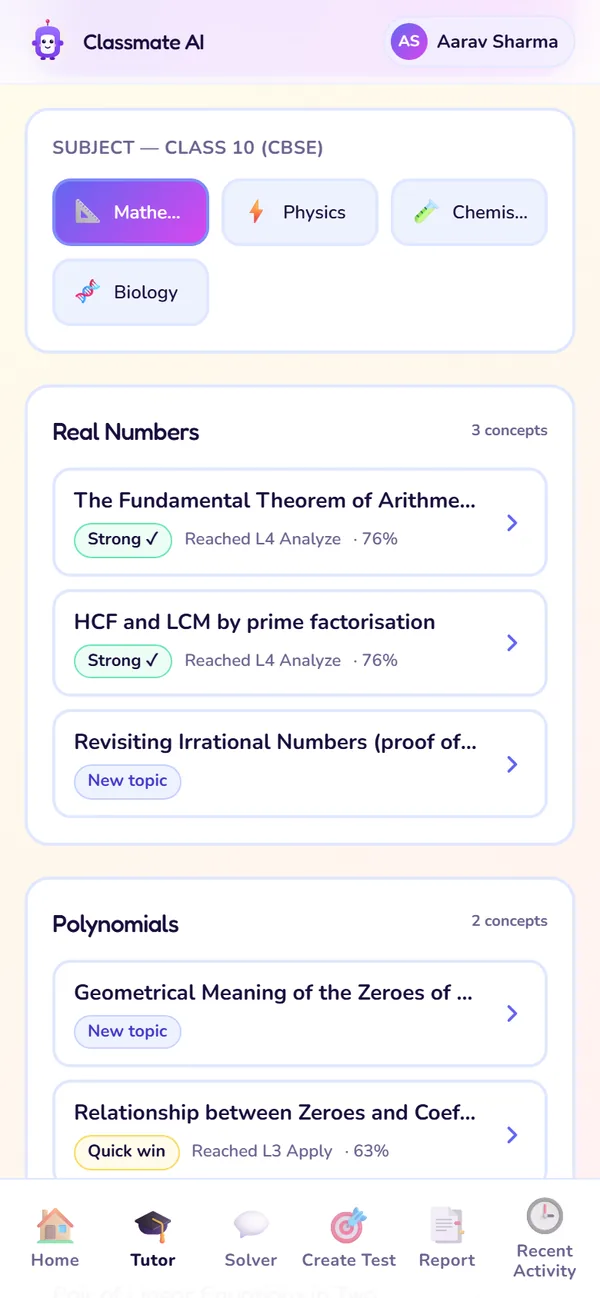
Subjects and chapters
- 1
Start here today
Today's concept, with a star if it scores big in exams. The bar shows how much of the subject you've mastered (e.g. 6 of 42).
Use it: Start every study session here.
- 2
Switch subject
Move between your subjects. Chapters follow your board and class.
Use it: When you want to study a different subject.
- 3
Chapter cards
Every concept in each chapter, with badges for exam weight, progress and level reached.
Use it: To pick one concept, like the one your teacher just covered.
- 4
Lesson language
Learn in English or Hinglish. Only Classy's explanations change.
Use it: If Hinglish makes a concept click faster.
- 5
Shortest Path
Opens your day-by-day plan to the exam.
Use it: To see what's coming up, or plan your week.
Chapter card badges
| Badge | What it means | What to do |
|---|---|---|
| Scores big | This concept carries a lot of marks in your exam. | Do these first when time is short. |
| ▸ Continue | You left this lesson halfway. | Tap to pick up where you stopped. It doesn't use up a new lesson. |
| Needs work | Your mastery of this concept is low. | Redo the lesson, then practise it. |
| Reached Apply | The highest level you've reached on the ladder. | Go again to reach Analyse. |
| 72% | Your current mastery score for the concept. | Aim for Strength (90%+), which counts as mastered. |
Scores big
- What it means
- This concept carries a lot of marks in your exam.
- What to do
- Do these first when time is short.
▸ Continue
- What it means
- You left this lesson halfway.
- What to do
- Tap to pick up where you stopped. It doesn't use up a new lesson.
Needs work
- What it means
- Your mastery of this concept is low.
- What to do
- Redo the lesson, then practise it.
Reached Apply
- What it means
- The highest level you've reached on the ladder.
- What to do
- Go again to reach Analyse.
72%
- What it means
- Your current mastery score for the concept.
- What to do
- Aim for Strength (90%+), which counts as mastered.
Start a lesson, step by step
- 1Open the Tutor tab.
- 2Check the subject at the top. Switch it if needed.
- 3Tap Start today's lesson, or open a chapter and tap one concept.
- 4Choose English or Hinglish under Lesson language (optional).
- 5Answer Classy's first question. It checks what you already know, so answer honestly.
- 6Keep answering. Tap Hint only after you've tried once.
Inside a lesson
Every lesson climbs a 4-level ladder. The bar fills as you go up; reaching Analyse means you really know the concept.
| Level | What Classy asks you to do | Example (Class 10 · Quadratic Equations) |
|---|---|---|
| 1 · Remember | Recall a fact, term or formula | What is the standard form of a quadratic equation? |
| 2 · Understand | Explain why something is true | Why does a negative discriminant mean there are no real roots? |
| 3 · Apply | Use the method on a new problem | Find the roots of x² − 5x + 6 = 0. |
| 4 · Analyse | Reason through an exam-style problem | For what value of k does kx² + 4x + 1 = 0 have equal roots? |
1 · Remember
- What Classy asks you to do
- Recall a fact, term or formula
- Example (Class 10 · Quadratic Equations)
- What is the standard form of a quadratic equation?
2 · Understand
- What Classy asks you to do
- Explain why something is true
- Example (Class 10 · Quadratic Equations)
- Why does a negative discriminant mean there are no real roots?
3 · Apply
- What Classy asks you to do
- Use the method on a new problem
- Example (Class 10 · Quadratic Equations)
- Find the roots of x² − 5x + 6 = 0.
4 · Analyse
- What Classy asks you to do
- Reason through an exam-style problem
- Example (Class 10 · Quadratic Equations)
- For what value of k does kx² + 4x + 1 = 0 have equal roots?
Answer box
Hint
Language switch
Lesson summary
When a lesson ends you see how it went: accuracy, answer quality, the level you reached and how much you leaned on hints, plus the next concept to learn.
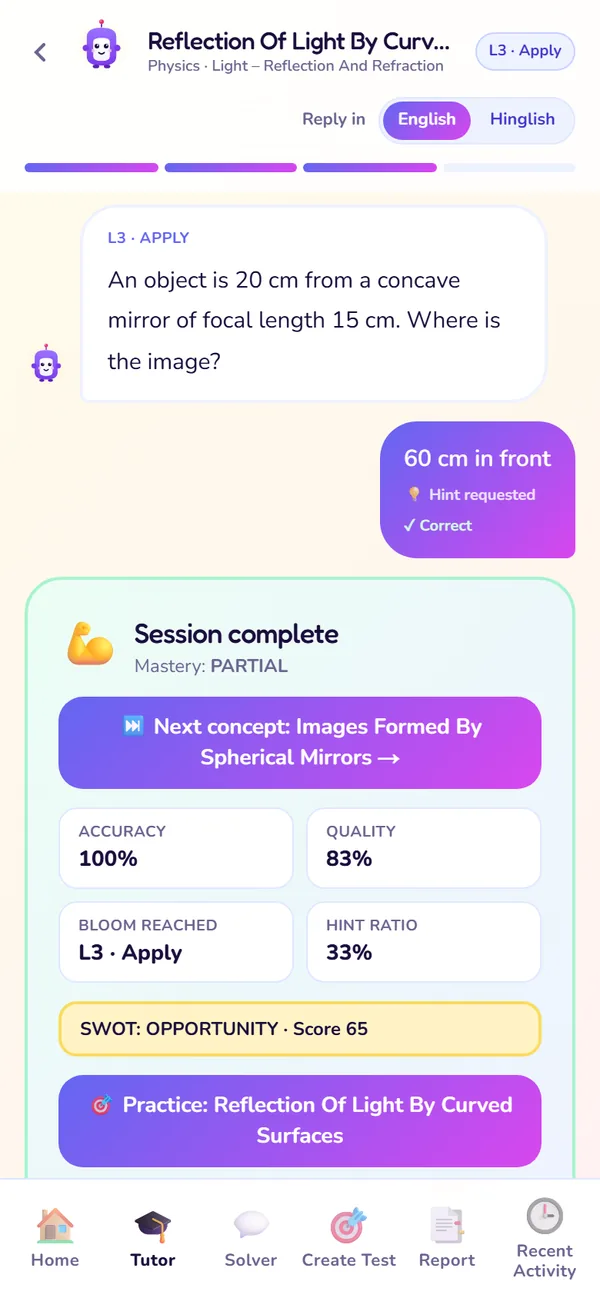
The summary at the end of a lesson
What to do next: tap Practice to test yourself while it's fresh, or Next concept to keep going. Your Report and SWOT update automatically.
Shortest Path: your plan to the exam
A day-by-day plan to your exam, with this week's priority topics first. It shows days to go, topics queued and topics mastered.
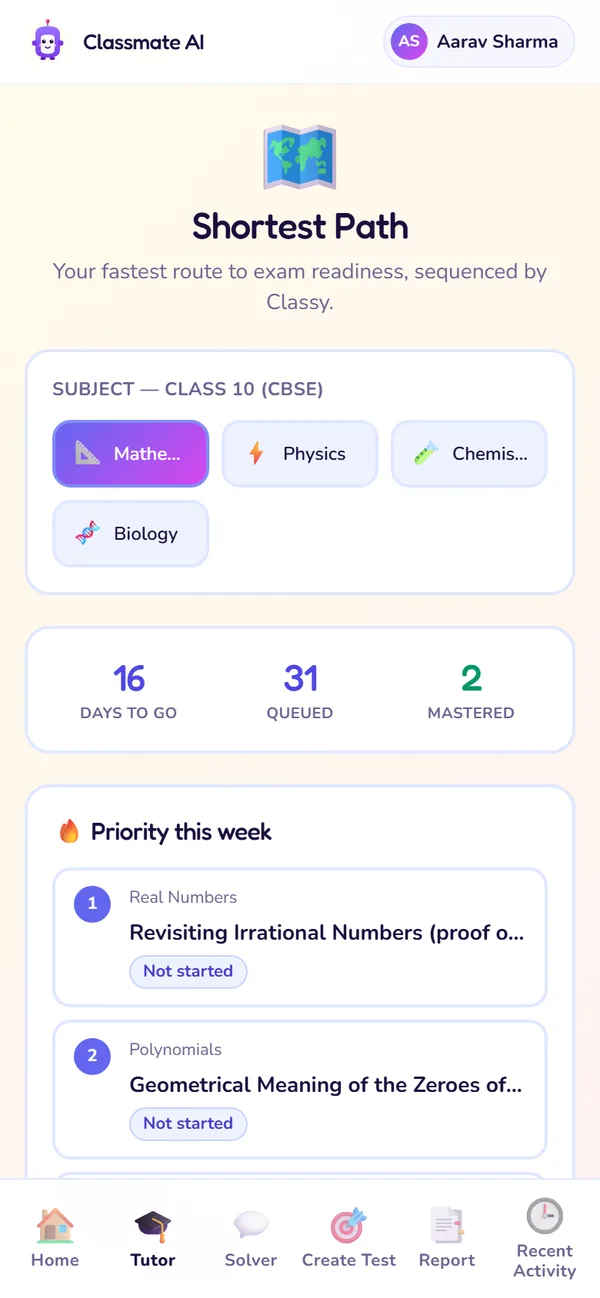
Countdown and priorities
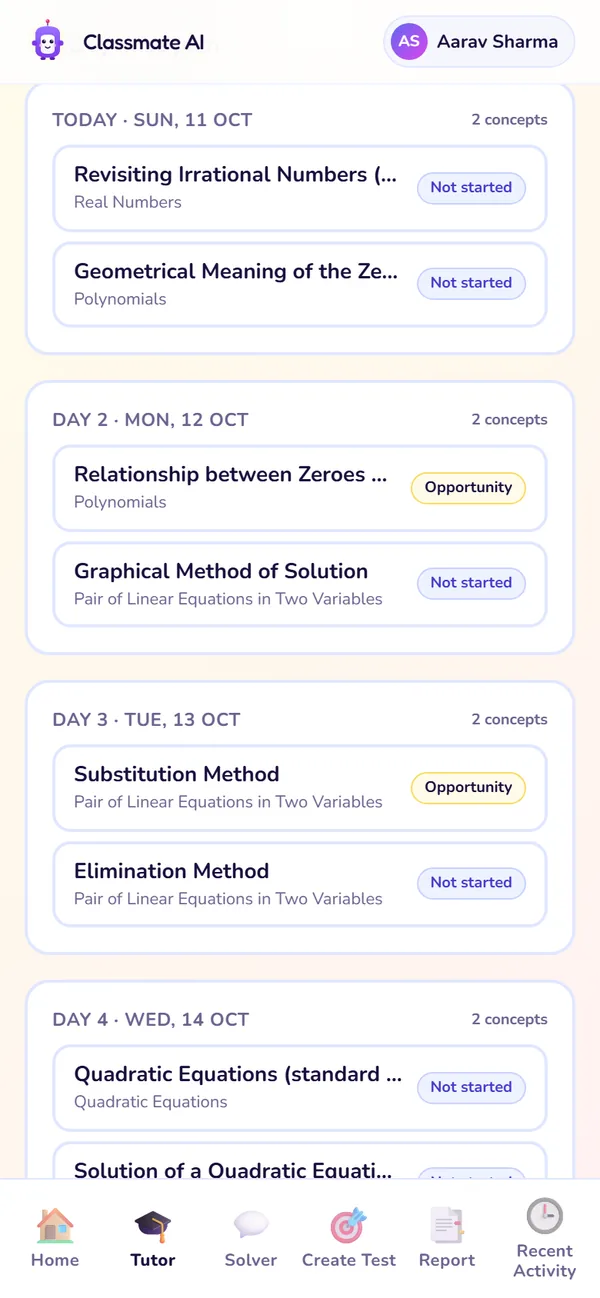
Day-wise plan
- 1
Countdown
Days to your exam, how many topics are queued and how many you've mastered.
Use it: A quick check of how far you've come.
- 2
Priority this week
The topics that matter most this week: high exam weight, and the ones that unlock later topics. Topics you've already mastered are skipped.
Use it: Do these first.
- 3
Day 1, Day 2…
What to study each day, always learning what a topic builds on first. The plan updates every time your SWOT changes.
Use it: Plan your week around it.
Open it from the Tutor tab, or from View full plan on Home. Shortest Path is available on both plans.
Plan limits for Tutor
| Free | Premium (and the 7-day trial) | |
|---|---|---|
| New lessons | 3 a week, reset Monday 12:00 AM IST | Unlimited (daily fair use) |
| Resuming an unfinished lesson | Free, doesn't use a lesson | Free |
| When the limit is reached | A "Weekly limit reached" message offers Premium, or wait for Monday | Doesn't apply |
New lessons
- Free
- 3 a week, reset Monday 12:00 AM IST
- Premium (and the 7-day trial)
- Unlimited (daily fair use)
Resuming an unfinished lesson
- Free
- Free, doesn't use a lesson
- Premium (and the 7-day trial)
- Free
When the limit is reached
- Free
- A "Weekly limit reached" message offers Premium, or wait for Monday
- Premium (and the 7-day trial)
- Doesn't apply
Questions about Tutor
Does Tutor just give me the answer?
What if I close the app in the middle of a lesson?
Can I choose any chapter, or only today's?
Which subjects are covered?
Still stuck?
Check Troubleshooting & FAQ, or write to us at contact@classmateai.in.
Was this page helpful? ·