Chapter 4 · Journey step 8
Solver: clear one doubt, step by step
Solver helps with one question at a time. Snap, type or say your doubt, and Classy works through it with you in small steps until you reach the answer yourself.
- Best for
- One stuck question
- Time per doubt
- About 5 min
- Where
- Solver tab
- Plan
- Free: 3 doubts a week
The Solver screen
What each numbered part does.
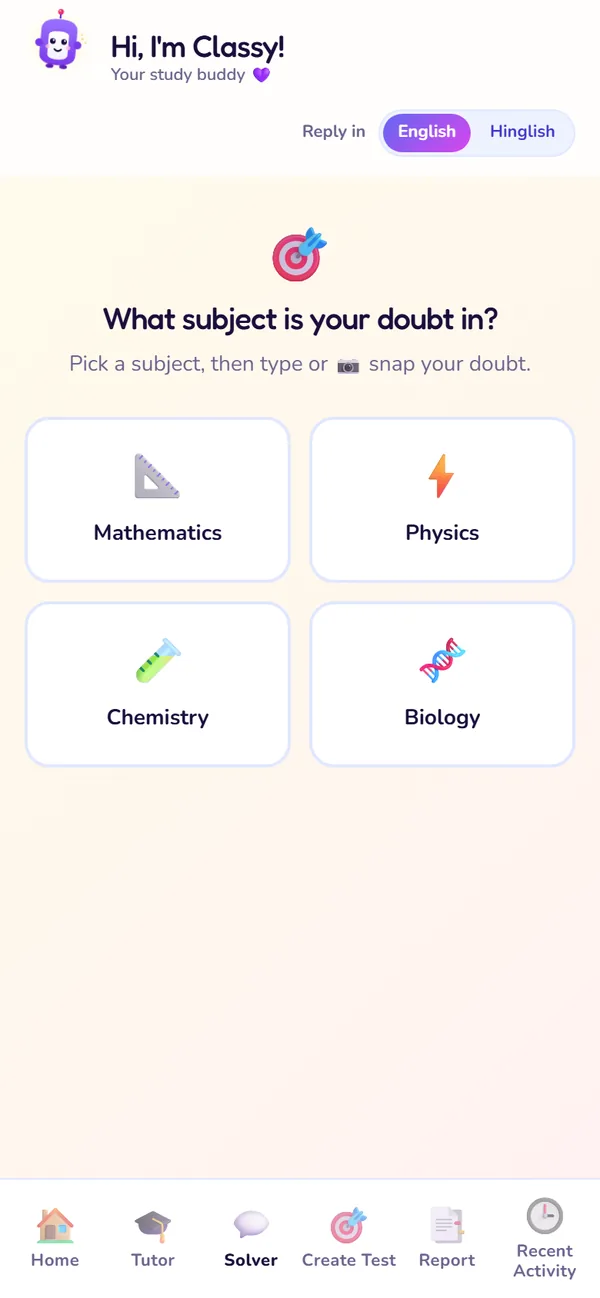
Pick a subject

Ask your doubt
- 1
Pick the subject
Choose the subject of your doubt so Classy answers the right way.
Use it: The first time you open Solver.
- 2
Photo, ∑ and mic
Snap the question, tap ∑ to type fractions, powers and roots with a live preview, or hold the mic and say it.
Use it: Photo for textbook questions; ∑ for equations; mic when it's quicker out loud.
- 3
Check what Classy read
After a photo, Classy shows the text it read. Fix any mistakes before you send.
Use it: Every time you send a photo.
- 4
Hint mode
Classy breaks the problem into steps and checks each one before the next hint.
Use it: Every doubt works this way.
- 5
Reply language
Choose the language Classy replies in.
Use it: If another language is easier for you.
- 6
Change subject
Shows the current subject. Tapping change starts a fresh doubt.
Use it: When your next question is in another subject.
Ask a doubt, step by step
- 1Open the Solver tab (or Solve a doubt on Home).
- 2Pick the subject.
- 3Tap the camera button and take a clear, flat photo of one question. Or type it, using ∑ for equations, or hold the mic.
- 4Check the text Classy read from your photo and fix anything wrong, then send.
- 5Answer Classy's first step. Ask for a hint only when you're stuck.
Hint mode
Solver doesn't hand you the answer. It breaks the problem into steps; you try each one, and Classy checks it before giving the next hint. A step tracker shows where you are.
You try first
Classy checks
You finish
After you solve it
Once you reach the answer, Solver offers four next steps.
| Button | What it does | Use it when |
|---|---|---|
| Learn this concept step-by-step | Opens Tutor to learn the concept behind the question. | You got there, but the idea still feels shaky. |
| Show me the full solution | The complete worked solution, written out. | To copy the neat method into your notebook. |
| Practice this topic | A short practice set on the same topic. | To check you can do it again on your own. |
| Try another problem | Clears the screen for your next doubt. | You have more homework to get through. |
Learn this concept step-by-step
- What it does
- Opens Tutor to learn the concept behind the question.
- Use it when
- You got there, but the idea still feels shaky.
Show me the full solution
- What it does
- The complete worked solution, written out.
- Use it when
- To copy the neat method into your notebook.
Practice this topic
- What it does
- A short practice set on the same topic.
- Use it when
- To check you can do it again on your own.
Try another problem
- What it does
- Clears the screen for your next doubt.
- Use it when
- You have more homework to get through.
Every solved doubt is saved in Recent Activity.
Plan limits for Solver
| Free | Premium (and the 7-day trial) | |
|---|---|---|
| Doubts | 3 a week, reset Monday 12:00 AM IST | Unlimited (daily fair use) |
| Practice this topic | Uses one of your 2 practice sets a week | Unlimited |
| When the limit is reached | A "Weekly limit reached" message offers Premium, or wait for Monday | Doesn't apply |
Doubts
- Free
- 3 a week, reset Monday 12:00 AM IST
- Premium (and the 7-day trial)
- Unlimited (daily fair use)
Practice this topic
- Free
- Uses one of your 2 practice sets a week
- Premium (and the 7-day trial)
- Unlimited
When the limit is reached
- Free
- A "Weekly limit reached" message offers Premium, or wait for Monday
- Premium (and the 7-day trial)
- Doesn't apply
Questions about Solver
Classy read my photo wrong. What do I do?
Can Solver just tell me the answer?
Which subjects does Solver cover?
Where are my old doubts?
Still stuck?
Check Troubleshooting & FAQ, or write to us at contact@classmateai.in.
Was this page helpful? ·