Chapter 8
Profile and settings
Your profile holds your details, your parent's details, your plan and your invoices. Open it from the profile menu.
- Best for
- Changing your details
- Time
- 2 min
- Where
- Profile menu → My Profile
- Plan
- Free and Premium
Your details
What each numbered part of My Profile does.
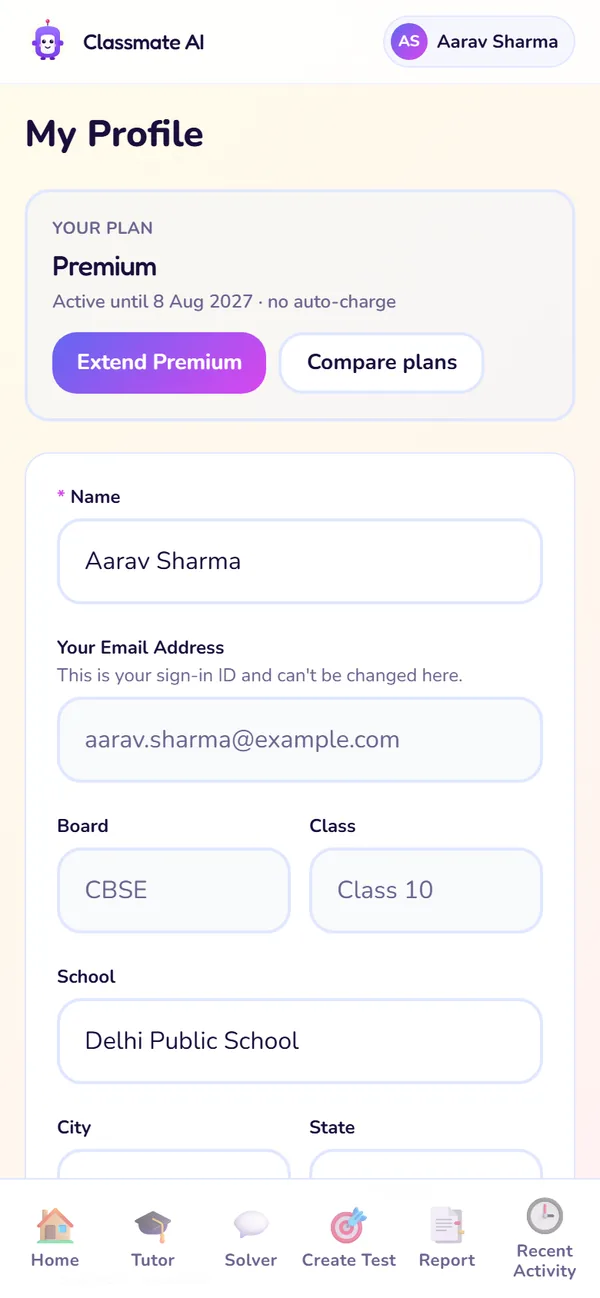
Plan and your details
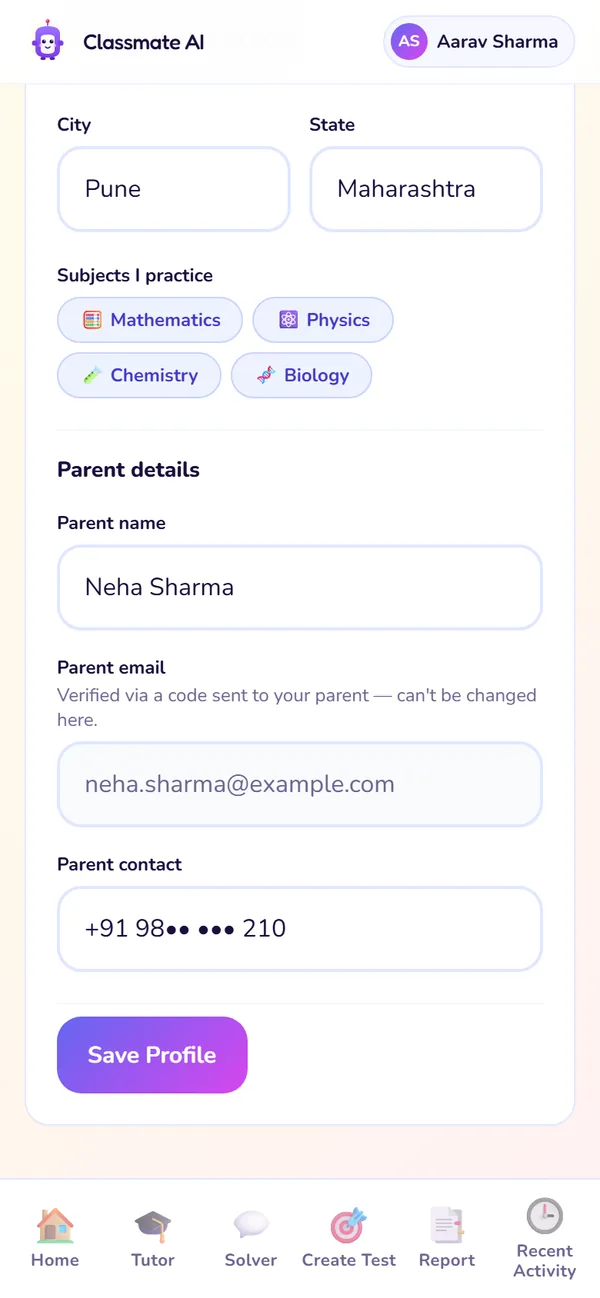
Parent details
- 1
Plan and invoices
Your current plan and a GST invoice for every payment.
Use it: To download an invoice or check when Premium ends.
- 2
Name
What Classy calls you.
Use it: If it's spelled wrong.
- 3
Email, board and class
Shown for reference. They're read-only; see below.
Use it: To check what your plan is built on.
- 4
School, city, state and subjects
Your school details and the subjects you practise.
Use it: When you change school.
- 5
Parent details
Your parent's name and contact number. The verified parent email is shown read-only.
Use it: To fix your parent's name or phone number.
Board, class and email
Your email is your sign-in ID, and your board and class decide your whole syllabus and plan, so they can't be edited in the app.
Add, change or re-invite a parent, step by step
The parent row on Home's Your plan card shows whether your parent has joined Classmate Co-pilot. Use it to add a parent, send the invite again or change the address.
- 1Open Home and find the Parent row on the Your plan card.
- 2No parent yet? Tap Add parent email, type the address and send the invite.
- 3Invite not opened? Tap Resend. Wrong address? Tap Change and type the right one.
- 4When your parent sets up Co-pilot, the row shows ✓ Confirmed.
Plan and invoices
| You want to | Go to |
|---|---|
| See your plan and when it ends | Profile menu, or the top of My Profile |
| Download a GST invoice | My Profile → Invoices |
| Upgrade to Premium | Pricing page |
See your plan and when it ends
- Go to
- Profile menu, or the top of My Profile
Download a GST invoice
- Go to
- My Profile → Invoices
Upgrade to Premium
- Go to
- Pricing page
Log out
Open the profile menu and tap Log out. To log back in, use your email and a new 6-digit code; there's no password to remember.
Still stuck?
Check Troubleshooting & FAQ, or write to us at contact@classmateai.in.
Was this page helpful? ·