Chapter 9 · For parents
Parent guide: follow your child's studies with Classmate Co-pilot
Classmate Co-pilot is the parent's view of Classmate AI. Open it once a day to see how long your child studied, what they worked on and whether anything needs your attention, without checking their phone. It takes under a minute.
How you get access
Your child adds your email from their account. You don't need to buy anything to get started.
- 1
Verify your email
When your child adds your email, you get a 6-digit code. Read it out to them so they can confirm your address.
- 2
Get the invite
Once your child finishes setting up, we email you an invite to Classmate Co-pilot.
- 3
Set your password
Open the invite link and choose a password for your parent account.
- 4
Log in any time
Use the parent login with your email and password. A short tour shows you around the first time.
Your daily view
What each card on the Co-pilot home screen tells you.
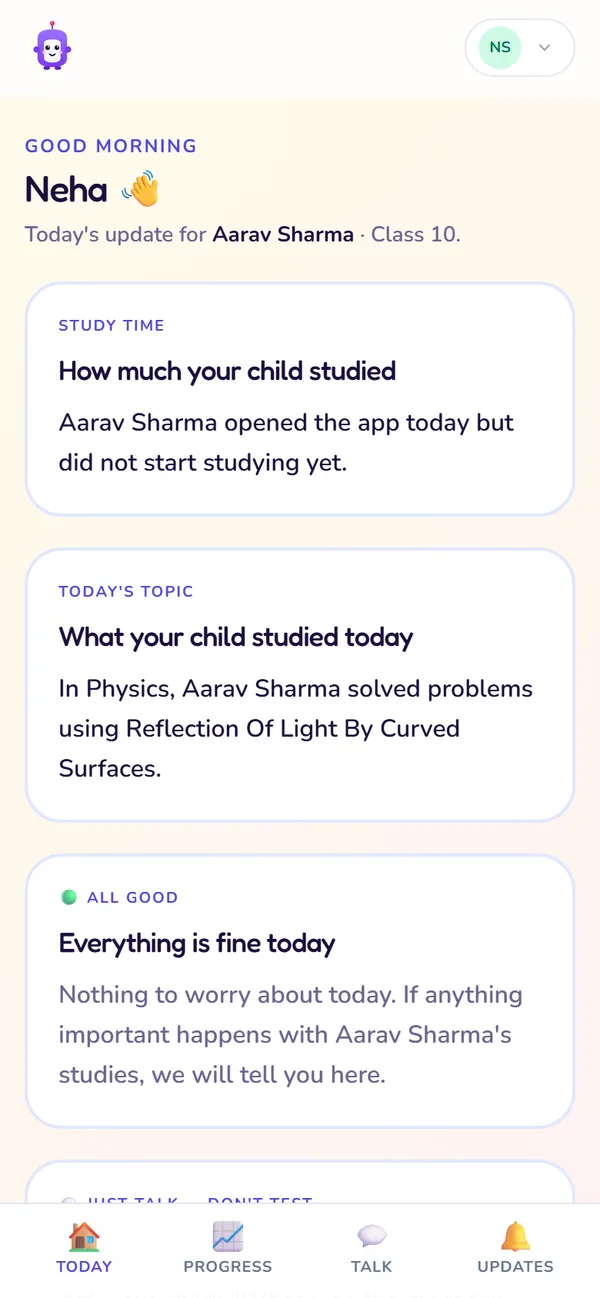
Today's update
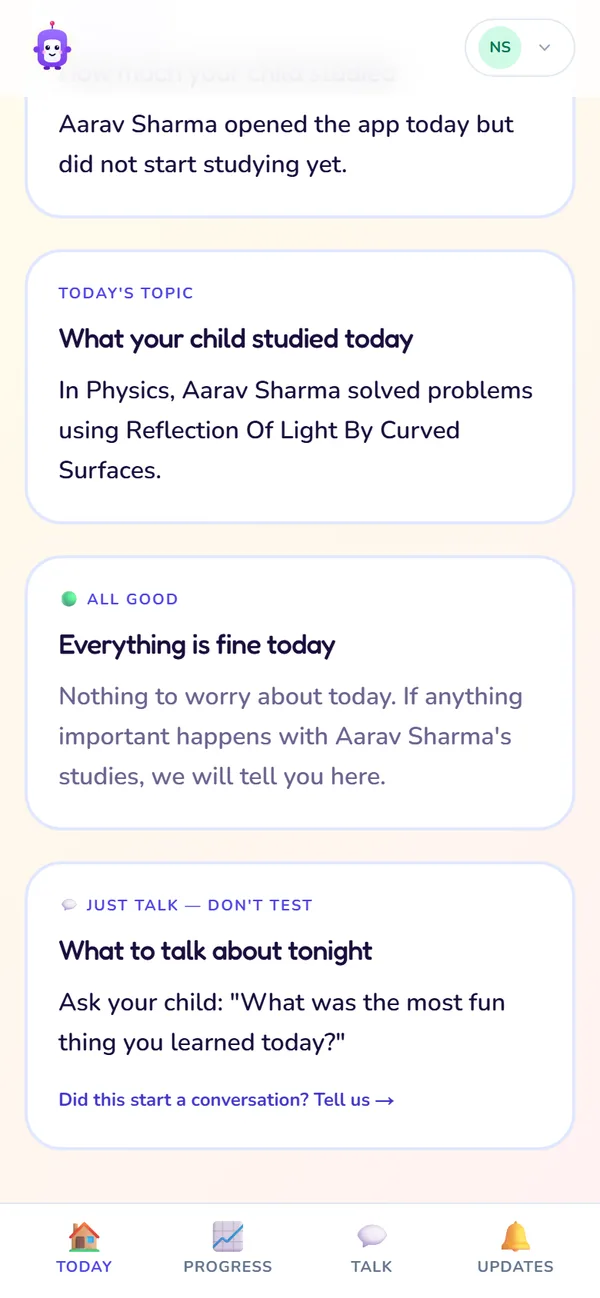
Talking points
- 1
Study time
How long your child studied today.
Use it: A quick daily check.
- 2
What they studied
The topics your child worked on today.
Use it: To know what's happening without having to ask.
- 3
Today's signal
Green when everything is fine; a different colour when something needs your attention.
Use it: If it isn't green, open Updates.
- 4
What to talk about tonight
One topic to chat about with your child.
Use it: At dinner, to show interest without pressure.
- 5
One thing this week
One small action for you this week, when there is one.
Use it: Plan it into your weekend.
The four tabs
What each tab shows, when to open it, and what it needs.
| Tab | What you see | Open it when… | Needs |
|---|---|---|---|
| Today | Study time, topics, today's signal, a talk prompt, one thing this week | Every day; under a minute | Any plan |
| Progress | This month's study habit, the topics your child knows, and whether they're improving | Weekly, for the bigger picture | Premium on your child's account |
| Talk | The last 7 conversation questions we suggested | You want something to ask about | Premium on your child's account |
| Updates | Things you should know, like a drop in study time or a new strength | The signal card isn't green | Premium on your child's account |
Today
- What you see
- Study time, topics, today's signal, a talk prompt, one thing this week
- Open it when…
- Every day; under a minute
- Needs
- Any plan
Progress
- What you see
- This month's study habit, the topics your child knows, and whether they're improving
- Open it when…
- Weekly, for the bigger picture
- Needs
- Premium on your child's account
Talk
- What you see
- The last 7 conversation questions we suggested
- Open it when…
- You want something to ask about
- Needs
- Premium on your child's account
Updates
- What you see
- Things you should know, like a drop in study time or a new strength
- Open it when…
- The signal card isn't green
- Needs
- Premium on your child's account
Who does what
The student studies; the parent follows and supports.
| Task | Student | Parent |
|---|---|---|
| Study with Tutor, Solver and tests | Yes | No |
| Add a parent's email | Yes, at signup or from Home | No |
| Verify the parent's email at signup | Types the code | Reads out the code |
| See daily study time and topics | Home and Activity | Co-pilot Today |
| See strengths and weak topics | Report and SWOT | Co-pilot Progress (Premium) |
| Start a conversation about studies | No | Talk prompts |
Study with Tutor, Solver and tests
- Student
- Yes
- Parent
- No
Add a parent's email
- Student
- Yes, at signup or from Home
- Parent
- No
Verify the parent's email at signup
- Student
- Types the code
- Parent
- Reads out the code
See daily study time and topics
- Student
- Home and Activity
- Parent
- Co-pilot Today
See strengths and weak topics
- Student
- Report and SWOT
- Parent
- Co-pilot Progress (Premium)
Start a conversation about studies
- Student
- No
- Parent
- Talk prompts
Getting the most from Co-pilot
- Open it once a day; a glance at the signal card is enough on most days.
- Use "What to talk about tonight" at dinner. Just talk; don't test.
- If the signal isn't green, read Updates before you raise it with your child.
- Plan "One thing this week" into your weekend.
Questions parents ask
I didn't get the invite email.
Do I need to pay separately?
Can I see my child's chats with Classy?
Can two parents follow the same child?
I forgot my password.
Still stuck?
Check Troubleshooting & FAQ, or write to us at contact@classmateai.in.
Was this page helpful? ·